Cloud ASHS: Overview
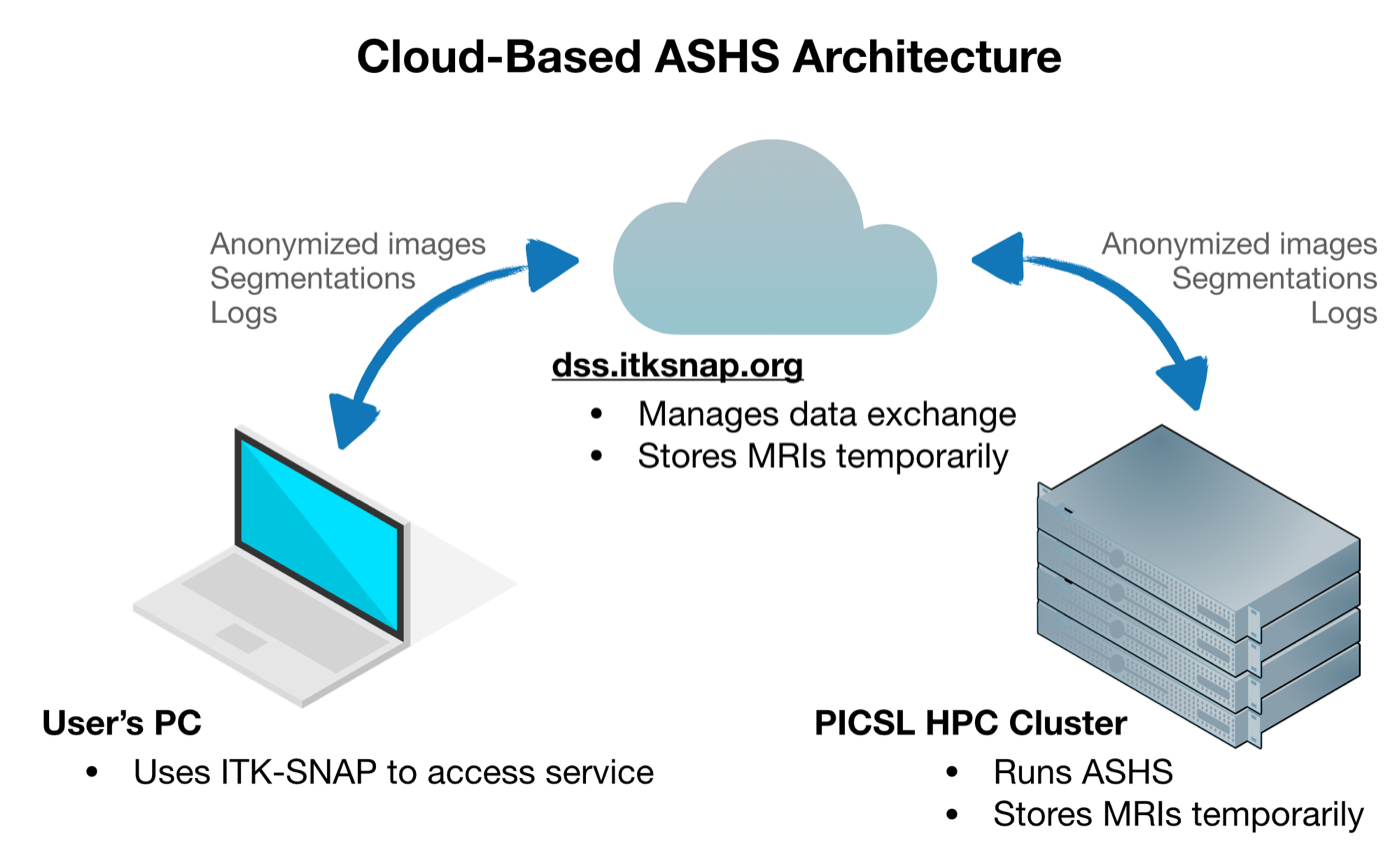
The easiest way to try out ASHS with an existing atlas is through our web-based system. Your images are anonymized, encrypted and sent to a secure server, where they are processed on a Linux cluster at the Penn Image Computing and Science Laboratory (PICSL) at the University of Pennsylvania. This service is currently provided for free.
Requirements
- You will need to install ITK-SNAP 3.8 or later
- You need a Google account (e.g., Gmail) to log in to the server
- Your data must be compatible with one of the atlases available on the system
GUI or command line?
The easiest way to run ASHS is with the graphical user interface (GUI) in ITK-SNAP. With just a few clicks you can send your images to the server for processing. Follow one of the tutorials below, depending on what kind of MRI data you want to segment:
- Cloud ASHS GUI tutorial: hippocampal subfields from T2-weighted and T1-weighted MRI
- Cloud ASHS GUI tutorial: medial temporal lobe subregions from T1-weighted MRI only
If you need to process several datasets from a script, it is better to use the command-line tool itksnap-wt, which is installed as part of ITK-SNAP. Follow the tutorial below:
For large projects, please install ASHS locally. Our server is currently set up to handle only a moderate number of requests.
See the equivalent page for HyperASHS.