HyperASHS: Basic Usage
Before you start
Complete the installation and make sure that your MRI data is compatible with the model you plan to use.
Overview
HyperASHS has a command-line interface, hrashs, for running segmentation on new subjects with pre-trained models. Models are downloaded from Hugging Face automatically the first time you use them.
1. List available models
View all the pre-trained models available for download:
This displays the model IDs, names, and a brief description of each model. Add -l for more detail.
2. View model details
Get detailed information about a specific model, including the required inputs, their expected resolution, and the papers to cite:
3. Run segmentation
Run segmentation on your subject's data:
For example, using T2w + T1w MRI and four threads:
To segment T1-weighted MRI only, omit the -f option and use a T1w model:
Note
The -g and -f options are the same as in ASHS Classic: -g is the T1-weighted (MPRAGE) image and -f is the T2-weighted (TSE) image. Unlike ASHS Classic, do not pass the T1w image to both options for T1-only segmentation. Just leave out -f.
Required arguments:
| Option | Description |
|---|---|
-a, --atlas |
Model ID (see hrashs list) or path to a model directory or config file |
-g, --t1 |
Path to the T1-weighted (MPRAGE) image |
-f, --t2 |
Path to the T2-weighted (TSE) image. Omit to run in T1-only mode |
-w, --workdir |
Output directory for results |
Optional arguments:
| Option | Description |
|---|---|
-I, --subject-id |
Subject ID, which will be prefixed to all output filenames |
-t, --threads |
Number of parallel threads for registration, etc. [default: 1] |
--device |
Device for computation (cuda or cpu) [default: auto]. To select specific GPUs, set the CUDA_VISIBLE_DEVICES environment variable |
--reg-t1t2 |
Use this T1w-to-T2w transform instead of automatic registration (see below) |
--reg-t1t2-identity |
Do not register T1w to T2w; trust the image headers instead |
-N, --no-overwrite |
Do not overwrite existing results |
-L, --no-links |
Copy the input files into the working directory instead of creating symbolic links |
-T, --tidy |
Reduce the number of intermediate files |
-k, --disable-ssl-verification |
Disable SSL verification for Hugging Face (e.g., behind a corporate proxy) |
Outputs
Segmentation results are saved in the final subdirectory of the working directory:
$ ls output/sub01/final
sub01_hyperres_volumes.csv
sub01_itksnap_labels.txt
sub01_tse_native_seg_left.nii.gz
sub01_tse_native_seg_right.nii.gz
sub01_tse_patch_hyperres_seg_left.nii.gz
sub01_tse_patch_hyperres_seg_right.nii.gz
[subject]_tse_patch_hyperres_seg_[side].nii.gz: the HyperASHS segmentations, at nearly isotropic resolution (e.g., 0.4 × 0.4 × 0.4 mm³). We recommend using these images for volumetry, thickness computation, running CRASHS, etc.[subject]_tse_native_seg_[side].nii.gz: the segmentations resampled to the space of the original T2-weighted MRI. They can be used for visualization or for computing similarity with manual segmentations. However, these segmentations have step-edge artifacts when the T2-weighted MRI is anisotropic.-
[subject]_hyperres_volumes.csv: the volume of each subregion, computed from the hyper-resolution segmentations, in mm³. The file has one row per subject, side and label: -
[subject]_itksnap_labels.txt: the label description file, which gives the name and color of each label for ITK-SNAP.
The ASHS Classic outputs have three variants of each segmentation (lfseg_heur, lfseg_corr_usegray, lfseg_corr_nogray). HyperASHS produces a single segmentation per side.
Quality control
Registration and segmentation QC images in PNG format are placed in the qc subdirectory of the working directory:
[subject]_registration_qc_[side].png: coronal and sagittal slices of the T2w MRI, the registered T1w MRI and the registered template around each hippocampus, so you can check that they line up[subject]_segmentation_qc_[side].png: coronal and sagittal slices of the segmentation over the T2w and T1w MRI
Please review these images for every subject before using the results.
Viewing the results in ITK-SNAP
To view the native-space segmentation over the T2-weighted MRI, type:
itksnap -g sub01_tse.nii.gz \
    -s output/sub01/final/sub01_tse_native_seg_left.nii.gz \
    -l output/sub01/final/sub01_itksnap_labels.txt
The results should look something like this:
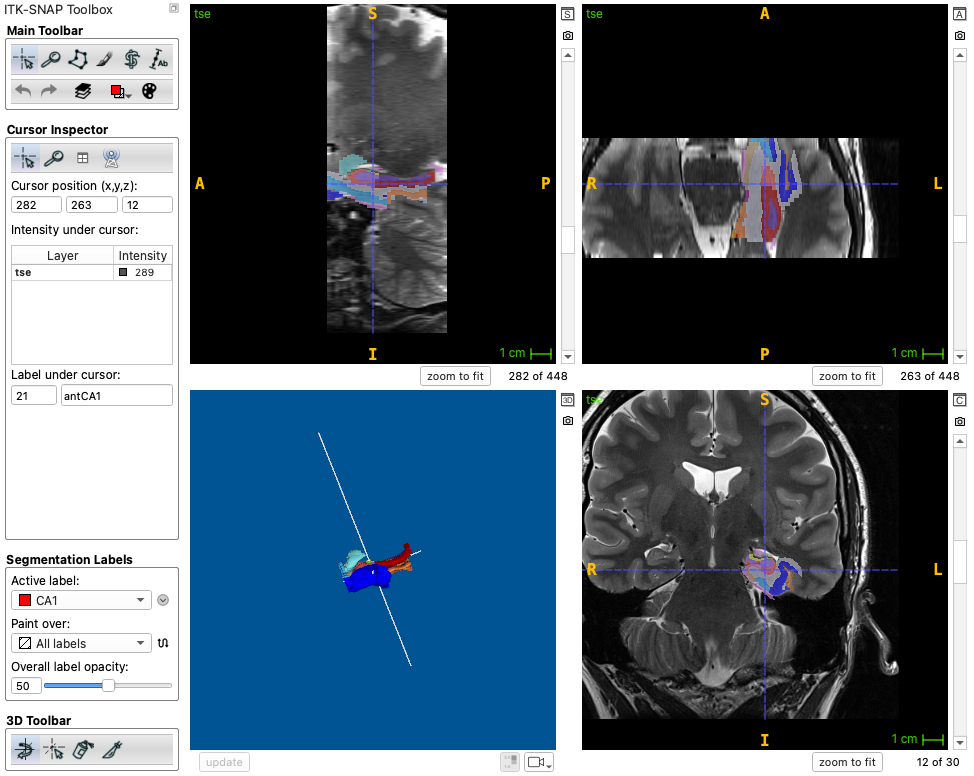
To view the hyper-resolution segmentation, you can open it over the upsampled T2-weighted MRI patch of the same side, which is placed in the working directory:
itksnap -g output/sub01/sub01_tse_patch_hyperres_left.nii.gz \
    -s output/sub01/final/sub01_tse_patch_hyperres_seg_left.nii.gz \
    -l output/sub01/final/sub01_itksnap_labels.txt
ITK-SNAP 4.6 and later can also display a segmentation whose voxel space differs from the main image, so you can view the hyper-resolution segmentation directly over the original T2-weighted MRI.
Surface-based modeling with CRASHS
CRASHS (Cortical Reconstruction for ASHS) fits a template surface mesh of the MTL cortex to an ASHS segmentation. This gives a point-by-point correspondence across subjects, so that measures such as cortical thickness can be mapped and compared along the cortex rather than averaged over whole subregions.
Surface-based modeling depends on how well the segmentation captures the shape of the structures. With ASHS Classic, segmentations of anisotropic T2-weighted MRI (e.g., 2 mm slices) have step edges along the slice direction, and surfaces and thickness measurements derived from them inherit these artifacts. The HyperASHS hyper-resolution segmentations are nearly isotropic and smooth in all directions, which makes them a much better input for CRASHS. Use the *_tse_patch_hyperres_seg_* images (not the native-space segmentations) as CRASHS input; see the CRASHS documentation for instructions.
Registration options
HyperASHS registers the T1w image to the T2w image automatically. If the QC images show that this registration failed, you can:
- Register the images yourself, e.g., with the registration tool in ITK-SNAP, using the T2w MRI as the fixed image and the T1w MRI as the moving image. Save the transform (in ITK-SNAP / Greedy / Convert3D format) and pass it with
--reg-t1t2 transform.mat. - If the scans were acquired in the same session and are already aligned in physical space, use
--reg-t1t2-identityto skip the registration.
Processing many subjects
hrashs run processes one subject at a time. To process a study, call it in a loop, e.g.:
for id in $(cat subjects.txt); do
  hrashs run -a PMC_Atlas -g data/${id}_t1.nii.gz -f data/${id}_t2.nii.gz \
    -I $id -w output/$id -t 4 -N
done
The -N option skips steps whose results already exist, so the loop can be restarted if it is interrupted.
Using classic ASHS? See the equivalent page for ASHS Classic.